Game guide · 58BLOG
The essentials of playing Kakurasu
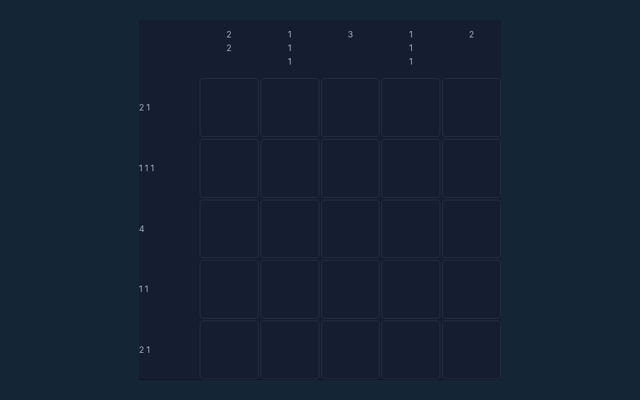
A careful first move helps you understand the round. Mark cells so every weighted row total and column total matches its clue. Start a new round when you are ready to try again. A 5×5 grid shows target sums at the right and bottom.
Generated 5×5 puzzles with an exact row-mask search for uniqueness before publication to the board. No calibrated difficulty labels.
Take a closer look while playing
Take a moment to check the current turn. Tap cells to mark or clear them. Current totals are displayed alongside the target totals. The game area remains available above the explanation.
Your goal
Take a moment to check the current turn. Mark cells so every weighted row total and column total matches its clue.
A walkthrough of the rules
- A 5×5 grid shows target sums at the right and bottom.
- A marked cell contributes its column number to its row sum, and its row number to its column sum.
- Tap cells to mark or clear them. Current totals are displayed alongside the target totals.
- Match all rows and columns to complete the puzzle. Each generated puzzle is checked to have one solution.
Using the playing area
Take a moment to check the current turn. Tap a square to mark or clear it. Undo restores the last state. New puzzle generates another checked board. Keep the goal in mind before your next move.
Work through an example
Take a moment to check the current turn. Marking columns 2 and 5 in the same row gives that row a total of 7. A mark in row 3 contributes 3 to its column. Try the rule on the board, then read the next instruction.
Where a round can go wrong
A careful first move helps you understand the round. The value is the position in the row or column, not a uniform count of marked squares. Try the rule on the board, then read the next instruction.
Questions about this game
When I start, what is the aim of Kakurasu?
Mark cells so every weighted row total and column total matches its clue. The game is played locally in your browser.
During a round, how do the controls work?
Tap a square to mark or clear it. Undo restores the last state. New puzzle generates another checked board. The controls work with mouse or touch.
When I start, can you show an example?
Marking columns 2 and 5 in the same row gives that row a total of 7. A mark in row 3 contributes 3 to its column. Keep the current game state in view while applying this rule.
Which mistake should I avoid?
The value is the position in the row or column, not a uniform count of marked squares. The instructions above use these same rules.
What rules and limits are used here?
Generated 5×5 puzzles with an exact row-mask search for uniqueness before publication to the board. No calibrated difficulty labels. You can start a new round from the game controls.
How many people can play here?
Solo. This is local browser play, not internet matchmaking. A new round resets the current game.
During a round, what does a marked square contribute?
Its column number to the row total, and its row number to the column total. No download or player account is required.
When I start, why can row and column contributions differ?
A square in row 2, column 5 contributes 5 to its row and 2 to its column. The instructions above use these same rules.
During a round, does each generated puzzle have one solution?
The generator searches the row-mask combinations and only accepts a puzzle with exactly one solution. A new round resets the current game.
On this page, can I clear a square?
Yes. Tap a marked square again, or use Undo. The controls work with mouse or touch.